تایپ اسکریپت
Next.js یک تجربهی توسعهی مبتنی بر تایپاسکریپت را برای ساخت برنامهی React شما فراهم میکند.
این فریمورک با پشتیبانی داخلی از تایپاسکریپت، پکیج های مورد نیاز را به صورت خودکار نصب میکند و تنظیمات مناسب را پیکربندی مینماید.
همچنین یک افزونه TypeScript برای ویرایشگر شما فراهم میآورد.
🎥 تماشا: درباره افزونه داخلی تایپ اسکریپت بیشتر بدانید → یوتوب (3 دقیقه) (opens in a new tab)
پروژه های جدید
ابزار create-next-app اکنون به طور پیشفرض با تایپاسکریپت ارائه میشود.
npx create-next-app@latestپروژههای موجود
برای اضافه کردن تایپاسکریپت به پروژهی خود، نام یکی از فایلها را به .ts یا .tsx تغییر دهید. سپس دستورهای next dev و next build را اجرا کنید تا وابستگیهای لازم به صورت خودکار نصب شوند و یک فایل tsconfig.json با تنظیمات توصیهشده اضافه شود.
اگر قبلاً یک فایل jsconfig.json داشتید، گزینه paths کامپایلر را از فایل قدیمی jsconfig.json کپی کرده و به فایل جدید tsconfig.json بچسبانید و سپس فایل قدیمی jsconfig.json را حذف کنید.
افزونهی تایپاسکریپت
Next.js شامل یک افزونه و بررسیگر نوع سفارشی تایپاسکریپت است که ویرایشگرهای کد مانند VS Code میتوانند از آن برای بررسی نوع پیشرفته و تکمیل خودکار auto-completion استفاده کنند.
برای فعال کردن این افزونه در VS Code، مراحل زیر را دنبال کنید:
- پالت فرمان را باز کنید (
Ctrl/⌘+Shift+P) - عبارت "TypeScript: Select TypeScript Version" را جستجو کنید.
- گزینهی "Use Workspace Version" را انتخاب کنید.
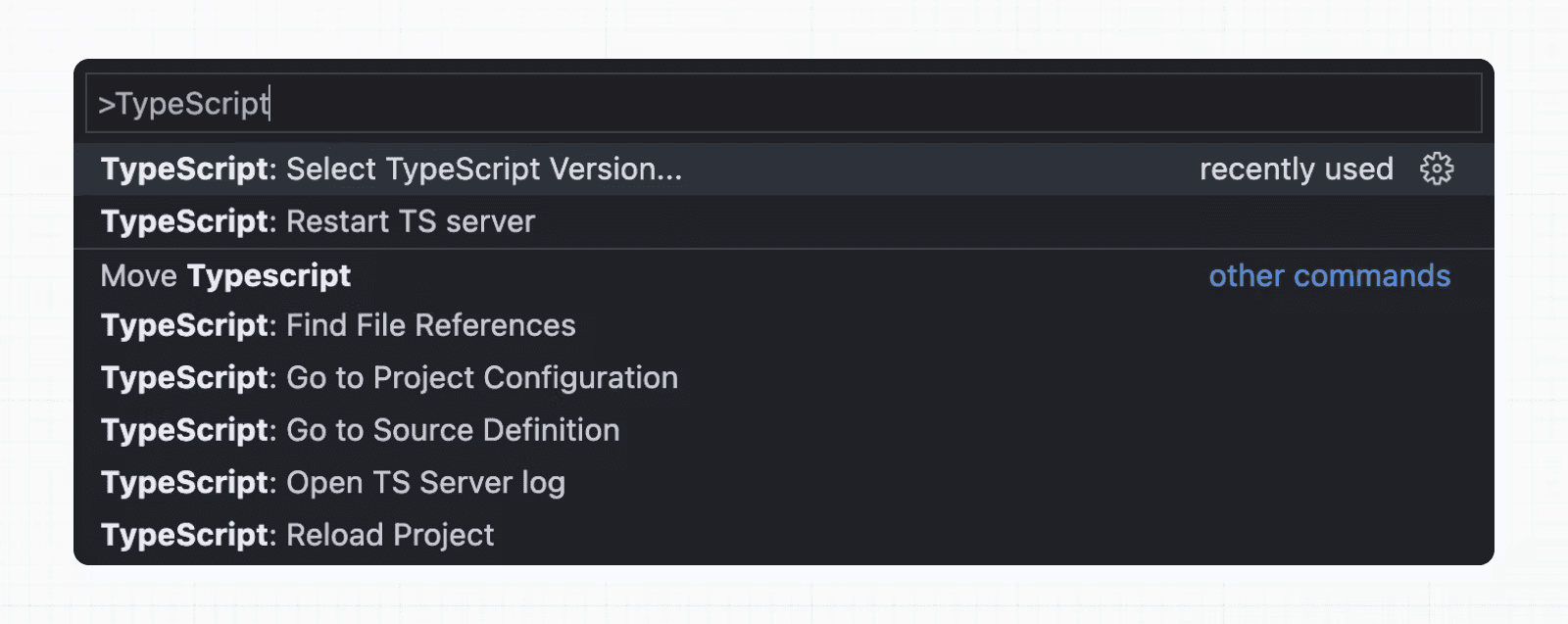
اکنون، هنگام ویرایش فایلها، افزونهی سفارشی فعال خواهد شد. در زمان اجرای next build، بررسیگر نوع سفارشی استفاده خواهد شد.
قابلیتهای افزونه
افزونهی تایپاسکریپت در موارد زیر کمک میکند:
- هشدار در صورت ارسال مقادیر نامعتبر برای گزینههای پیکربندی بخش (segment config options).
- نمایش گزینههای موجود و مستندات مرتبط با متن.
- اطمینان از استفاده صحیح دستورالعمل
use client. - اطمینان از استفادهی قلابهای سمت کاربر (مانند useState) فقط در کامپوننتهای سمت کلاینت.
خوب است بدانید: در آینده ویژگیهای بیشتری اضافه خواهد شد.
حداقل نسخهی تایپاسکریپت
توصیه میشود حداقل از v4.5.2 تایپ اسکریپت استفاده کنید تا از ویژگیهای دستور زبانی مانند type modifiers on import names (opens in a new tab) و بهبودهای عملکرد (opens in a new tab) بهرهمند شوید.
لینکهای دارای تایپ ایستا
Next.js میتواند هنگام استفاده از next/link لینکها را به صورت ایستا تایپ کند تا از اشتباه تایپی و دیگر خطاها جلوگیری کند و در نتیجه ایمنی نوع (type safety) را در حین پیمایش بین صفحات بهبود بخشد.
برای فعال کردن این قابلیت، نیاز است تا گزینهی experimental.typedRoutes فعال شود و همچنین پروژه از تایپاسکریپت استفاده کند.
/** @type {import('next').NextConfig} */
const nextConfig = {
	experimental: {
		typedRoutes: true,
	},
}

module.exports = nextConfig
Next.js فایلی با تعریف لینکها در پوشهی .next/types ایجاد خواهد کرد. این فایل حاوی اطلاعاتی دربارهی تمامی مسیرهای موجود در اپلیکیشن شما است که تایپاسکریپت میتواند از آن برای ارائهی بازخورد در ویرایشگر شما دربارهی لینکهای نامعتبر استفاده کند.
در حال حاضر، پشتیبانی آزمایشی شامل هر رشتهی تحتاللفظی، از جمله بخشهای پویا است. برای رشتههای غیر تحتاللفظی، در حال حاضر نیاز است تا به صورت دستی href را با as Route ریختیابی کنید.
import type { Route } from 'next';
import Link from 'next/link'

// No TypeScript errors if href is a valid route
<Link href="/about" />
<Link href="/blog/nextjs" />
<Link href={`/blog/${slug}`} />
<Link href={('/blog' + slug) as Route} />

// TypeScript errors if href is not a valid route
<Link href="/aboot" />
To accept href in a custom component wrapping next/link, use a generic:
import type { Route } from 'next'
import Link from 'next/link'

function Card<T extends string>({ href }: { href: Route<T> | URL }) {
	return (
		<Link href={href}>
			<div>My Card</div>
		</Link>
	)
}
How does it work?
When running
next devornext build, Next.js generates a hidden.d.tsfile inside.nextthat contains information about all existing routes in your application (all valid routes as thehreftype ofLink). This.d.tsfile is included intsconfig.jsonand the TypeScript compiler will check that.d.tsand provide feedback in your editor about invalid links.
End-to-End Type Safety
The Next.js App Router has enhanced type safety. This includes:
- No serialization of data between fetching function and page: You can
fetchdirectly in components, layouts, and pages on the server. This data does not need to be serialized (converted to a string) to be passed to the client side for consumption in React. Instead, sinceappuses Server Components by default, we can use values likeDate,Map,Set, and more without any extra steps. Previously, you needed to manually type the boundary between server and client with Next.js-specific types. - Streamlined data flow between components: With the removal of
_appin favor of root layouts, it is now easier to visualize the data flow between components and pages. Previously, data flowing between individualpagesand_appwere difficult to type and could introduce confusing bugs. With colocated data fetching in the App Router, this is no longer an issue.
Data Fetching in Next.js now provides as close to end-to-end type safety as possible without being prescriptive about your database or content provider selection.
We're able to type the response data as you would expect with normal TypeScript. For example:
async function getData() {
	const res = await fetch('https://api.example.com/...')
	// The return value is *not* serialized
	// You can return Date, Map, Set, etc.
	return res.json()
}

export default async function Page() {
	const name = await getData()

	return '...'
}
For complete end-to-end type safety, this also requires your database or content provider to support TypeScript. This could be through using an ORM (opens in a new tab) or type-safe query builder.
Async Server Component TypeScript Error
To use an async Server Component with TypeScript, ensure you are using TypeScript 5.1.3 or higher and @types/react 18.2.8 or higher.
If you are using an older version of TypeScript, you may see a 'Promise<Element>' is not a valid JSX element type error. Updating to the latest version of TypeScript and @types/react should resolve this issue.
Passing Data Between Server & Client Components
When passing data between a Server and Client Component through props, the data is still serialized (converted to a string) for use in the browser. However, it does not need a special type. It’s typed the same as passing any other props between components.
Further, there is less code to be serialized, as un-rendered data does not cross between the server and client (it remains on the server). This is only now possible through support for Server Components.
Path aliases and baseUrl
Next.js automatically supports the tsconfig.json "paths" and "baseUrl" options.
You can learn more about this feature on the Module Path aliases documentation.
Type checking next.config.js
The next.config.js file must be a JavaScript file as it does not get parsed by Babel or TypeScript, however you can add some type checking in your IDE using JSDoc as below:
// @ts-check

/**
 * @type {import('next').NextConfig}
 **/
const nextConfig = {
	/* config options here */
}

module.exports = nextConfig
Incremental type checking
Since v10.2.1 Next.js supports incremental type checking (opens in a new tab) when enabled in your tsconfig.json, this can help speed up type checking in larger applications.
Ignoring TypeScript Errors
Next.js fails your production build (next build) when TypeScript errors are present in your project.
If you'd like Next.js to dangerously produce production code even when your application has errors, you can disable the built-in type checking step.
If disabled, be sure you are running type checks as part of your build or deploy process, otherwise this can be very dangerous.
Open next.config.js and enable the ignoreBuildErrors option in the typescript config:
module.exports = {
	typescript: {
		// !! WARN !!
		// Dangerously allow production builds to successfully complete even if
		// your project has type errors.
		// !! WARN !!
		ignoreBuildErrors: true,
	},
}
Custom Type Declarations
When you need to declare custom types, you might be tempted to modify next-env.d.ts. However, this file is automatically generated, so any changes you make will be overwritten. Instead, you should create a new file, let's call it new-types.d.ts, and reference it in your tsconfig.json:
{
	"compilerOptions": {
		"skipLibCheck": true
		//...truncated...
	},
	"include": [
		"new-types.d.ts",
		"next-env.d.ts",
		".next/types/**/*.ts",
		"**/*.ts",
		"**/*.tsx"
	],
	"exclude": ["node_modules"]
}
Version Changes
| Version | Changes |
|---|---|
v13.2.0 | Statically typed links are available in beta. |
v12.0.0 | SWC is now used by default to compile TypeScript and TSX for faster builds. |
v10.2.1 | Incremental type checking (opens in a new tab) support added when enabled in your tsconfig.json. |